PS4 / PS5
Why Does PS5 Overheat? Common Causes, Warning Signs & Solutions
1 October 2026
The PlayStation 5 (PS5) is a powerful gaming console designed to handle demanding games at high performance. However, like any electronic device, the PS5 can develop overheating problems, especially after years of use or when the cooling system is not working properly.
An overheating PS5 should not be ignored. Excessive heat can cause performance problems, unexpected shutdowns and, in severe cases, damage to internal components.
What Causes a PS5 to Overheat?
1. Dust Buildup Inside the Console
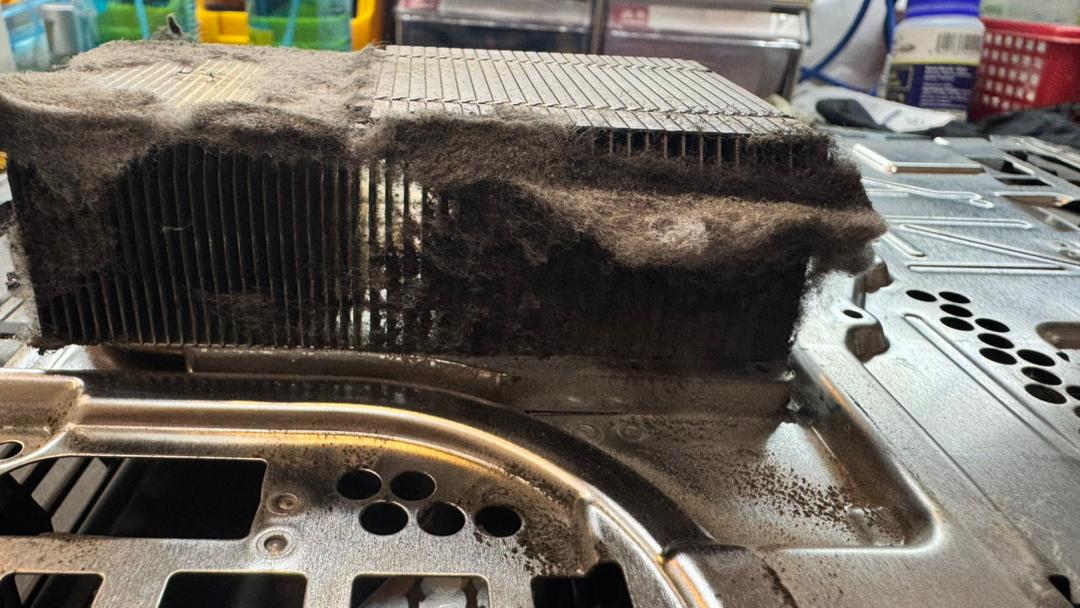
One of the most common causes of PS5 overheating is dust accumulation.
Over time, dust can build up around:
Cooling fan
Air intake vents
Heatsink fins
Internal airflow paths
Power supply area
When airflow is restricted, hot air cannot escape efficiently. The cooling fan may then need to operate at a higher speed to keep the temperature under control.
Regular cleaning can help maintain proper airflow and cooling performance.
2. Cooling Fan Problems
The PS5 relies on its internal fan to move air through the heatsink and out of the console.
A fan that is:
Noisy
Spinning unusually fast
Intermittently stopping
Not spinning properly
Producing abnormal sounds
may indicate a cooling system problem.
If the fan is not moving enough air, the console temperature can rise rapidly during gaming.
3. Heatsink Blockage
The heatsink transfers heat away from the PS5's processor and allows the fan to remove that heat.
Dust and debris can accumulate between the heatsink fins and create a blockage.
Even if the fan is spinning normally, a heavily blocked heatsink can significantly reduce cooling efficiency.
4. Poor Airflow Around the PS5
The location of the console also affects cooling.
Placing a PS5:
Inside a closed cabinet
Directly against a wall
In a tight compartment
Near another heat-producing device
In an area with poor ventilation
can restrict the intake and exhaust airflow.
The PS5 needs sufficient space around its ventilation areas to allow cool air to enter and hot air to leave.
5. High Room Temperature
Ambient temperature also plays a role.
When the surrounding room is already hot, the cooling system has less temperature difference available to remove heat from the console.
This can become particularly noticeable in hot climates such as Malaysia, especially in rooms without air conditioning or adequate ventilation.
6. Thermal Interface Problems
The processor inside the PS5 transfers heat to the cooling system through a thermal interface material.
If there is a problem with the thermal interface or the cooling assembly, heat transfer may become less efficient.
However, replacing thermal material should not automatically be the first solution.
A PS5 that is overheating should first be properly diagnosed to determine whether the actual problem is airflow, fan operation, heatsink condition, thermal transfer or another hardware issue.
7. Liquid Metal-Related Issues
PS5 uses liquid metal as part of its thermal interface between the processor and heatsink.
Liquid metal requires careful handling because it is electrically conductive.
If the console has previously been opened or incorrectly serviced, problems with the liquid-metal application or surrounding components can potentially affect thermal performance.
This is one reason why PS5 thermal servicing should be performed carefully by someone experienced with PS5 hardware.
What Are the Signs of an Overheating PS5?
Common symptoms include:
"Your PS5 is too hot" warning
Console shutting down during gaming
Fan becoming extremely loud
Games crashing unexpectedly
Console becoming unusually hot
Performance instability
PS5 turning off after running for some time
Fan running at very high speed
Console working normally when cold but shutting down after warming up
If the PS5 repeatedly shuts down because of temperature, continuing to use it for long gaming sessions is not recommended until the cause has been identified.
Why Cleaning the PS5 May Not Always Fix Overheating
A common misconception is that overheating always means the PS5 simply needs cleaning.
Cleaning can solve many airflow-related problems, but it is not a universal solution.
For example, if the fan is defective, the heatsink has another problem, thermal transfer is poor, or there is an underlying motherboard issue, simply removing surface dust may not solve the problem.
A proper diagnosis should identify why the PS5 is overheating, rather than replacing or cleaning parts without testing.
Does a Loud Fan Always Mean the PS5 Is Overheating?
Not necessarily.
The PS5 fan automatically changes speed depending on the console's temperature and workload.
A louder fan during demanding games can be normal.
The important factor is whether the fan behaviour is accompanied by symptoms such as:
Temperature warnings
Unexpected shutdowns
Excessive heat
Game crashes
Abnormally high fan speed
Reduced stability
A technician should assess the console before determining whether the fan noise is actually abnormal.
Can an Overheating PS5 Damage the Motherboard?
Repeated thermal problems can put additional stress on electronic components.
The PS5 contains a complex motherboard with high-performance processors, memory, power-management circuits and other components.
If the console repeatedly reaches abnormal temperatures or shuts down unexpectedly, the underlying cooling problem should be investigated rather than ignored.
How Can You Prevent PS5 Overheating?
You can reduce the risk of overheating by:
Keeping the ventilation areas clean.
Providing adequate space around the console.
Avoiding enclosed cabinets.
Keeping the console away from direct heat sources.
Cleaning the cooling system periodically.
Making sure the fan is operating correctly.
Avoiding unnecessary disassembly.
Having unusual overheating symptoms professionally diagnosed.
When Should You Send Your PS5 for Repair?
Consider having the PS5 inspected if:
It displays a temperature warning.
It shuts down while gaming.
The fan becomes unusually loud.
It becomes excessively hot.
Cleaning does not solve the problem.
The console has previously been opened or serviced.
The problem keeps returning after servicing.
A proper PS5 diagnostic can help determine whether the problem is related to the fan, airflow, heatsink, thermal interface or another hardware component.
Conclusion
PS5 overheating can have several different causes. Dust and restricted airflow are common, but overheating can also be related to the fan, heatsink, thermal interface or previous servicing.
The most important thing is to identify the actual cause instead of simply replacing thermal material or cleaning the console without diagnosis.
If your PS5 is overheating, shutting down or running its fan unusually loudly, professional inspection can help prevent a small cooling problem from becoming a more serious hardware issue.
PS5 Overheating Repair & Diagnostic
KR REVOTECH SERVICES provides PS5 repair and motherboard-level diagnostics, including cooling-system inspection and hardware troubleshooting.
If your PS5 is overheating, shutting down during gaming or experiencing abnormal fan behaviour, bring it in for proper diagnosis before the problem gets worse.
An overheating PS5 should not be ignored. Excessive heat can cause performance problems, unexpected shutdowns and, in severe cases, damage to internal components.
What Causes a PS5 to Overheat?
1. Dust Buildup Inside the Console
One of the most common causes of PS5 overheating is dust accumulation.
Over time, dust can build up around:
Cooling fan
Air intake vents
Heatsink fins
Internal airflow paths
Power supply area
When airflow is restricted, hot air cannot escape efficiently. The cooling fan may then need to operate at a higher speed to keep the temperature under control.
Regular cleaning can help maintain proper airflow and cooling performance.
2. Cooling Fan Problems
The PS5 relies on its internal fan to move air through the heatsink and out of the console.
A fan that is:
Noisy
Spinning unusually fast
Intermittently stopping
Not spinning properly
Producing abnormal sounds
may indicate a cooling system problem.
If the fan is not moving enough air, the console temperature can rise rapidly during gaming.
3. Heatsink Blockage
The heatsink transfers heat away from the PS5's processor and allows the fan to remove that heat.
Dust and debris can accumulate between the heatsink fins and create a blockage.
Even if the fan is spinning normally, a heavily blocked heatsink can significantly reduce cooling efficiency.
4. Poor Airflow Around the PS5
The location of the console also affects cooling.
Placing a PS5:
Inside a closed cabinet
Directly against a wall
In a tight compartment
Near another heat-producing device
In an area with poor ventilation
can restrict the intake and exhaust airflow.
The PS5 needs sufficient space around its ventilation areas to allow cool air to enter and hot air to leave.
5. High Room Temperature
Ambient temperature also plays a role.
When the surrounding room is already hot, the cooling system has less temperature difference available to remove heat from the console.
This can become particularly noticeable in hot climates such as Malaysia, especially in rooms without air conditioning or adequate ventilation.
6. Thermal Interface Problems
The processor inside the PS5 transfers heat to the cooling system through a thermal interface material.
If there is a problem with the thermal interface or the cooling assembly, heat transfer may become less efficient.
However, replacing thermal material should not automatically be the first solution.
A PS5 that is overheating should first be properly diagnosed to determine whether the actual problem is airflow, fan operation, heatsink condition, thermal transfer or another hardware issue.
7. Liquid Metal-Related Issues
PS5 uses liquid metal as part of its thermal interface between the processor and heatsink.
Liquid metal requires careful handling because it is electrically conductive.
If the console has previously been opened or incorrectly serviced, problems with the liquid-metal application or surrounding components can potentially affect thermal performance.
This is one reason why PS5 thermal servicing should be performed carefully by someone experienced with PS5 hardware.
What Are the Signs of an Overheating PS5?
Common symptoms include:
"Your PS5 is too hot" warning
Console shutting down during gaming
Fan becoming extremely loud
Games crashing unexpectedly
Console becoming unusually hot
Performance instability
PS5 turning off after running for some time
Fan running at very high speed
Console working normally when cold but shutting down after warming up
If the PS5 repeatedly shuts down because of temperature, continuing to use it for long gaming sessions is not recommended until the cause has been identified.
Why Cleaning the PS5 May Not Always Fix Overheating
A common misconception is that overheating always means the PS5 simply needs cleaning.
Cleaning can solve many airflow-related problems, but it is not a universal solution.
For example, if the fan is defective, the heatsink has another problem, thermal transfer is poor, or there is an underlying motherboard issue, simply removing surface dust may not solve the problem.
A proper diagnosis should identify why the PS5 is overheating, rather than replacing or cleaning parts without testing.
Does a Loud Fan Always Mean the PS5 Is Overheating?
Not necessarily.
The PS5 fan automatically changes speed depending on the console's temperature and workload.
A louder fan during demanding games can be normal.
The important factor is whether the fan behaviour is accompanied by symptoms such as:
Temperature warnings
Unexpected shutdowns
Excessive heat
Game crashes
Abnormally high fan speed
Reduced stability
A technician should assess the console before determining whether the fan noise is actually abnormal.
Can an Overheating PS5 Damage the Motherboard?
Repeated thermal problems can put additional stress on electronic components.
The PS5 contains a complex motherboard with high-performance processors, memory, power-management circuits and other components.
If the console repeatedly reaches abnormal temperatures or shuts down unexpectedly, the underlying cooling problem should be investigated rather than ignored.
How Can You Prevent PS5 Overheating?
You can reduce the risk of overheating by:
Keeping the ventilation areas clean.
Providing adequate space around the console.
Avoiding enclosed cabinets.
Keeping the console away from direct heat sources.
Cleaning the cooling system periodically.
Making sure the fan is operating correctly.
Avoiding unnecessary disassembly.
Having unusual overheating symptoms professionally diagnosed.
When Should You Send Your PS5 for Repair?
Consider having the PS5 inspected if:
It displays a temperature warning.
It shuts down while gaming.
The fan becomes unusually loud.
It becomes excessively hot.
Cleaning does not solve the problem.
The console has previously been opened or serviced.
The problem keeps returning after servicing.
A proper PS5 diagnostic can help determine whether the problem is related to the fan, airflow, heatsink, thermal interface or another hardware component.
Conclusion
PS5 overheating can have several different causes. Dust and restricted airflow are common, but overheating can also be related to the fan, heatsink, thermal interface or previous servicing.
The most important thing is to identify the actual cause instead of simply replacing thermal material or cleaning the console without diagnosis.
If your PS5 is overheating, shutting down or running its fan unusually loudly, professional inspection can help prevent a small cooling problem from becoming a more serious hardware issue.
PS5 Overheating Repair & Diagnostic
KR REVOTECH SERVICES provides PS5 repair and motherboard-level diagnostics, including cooling-system inspection and hardware troubleshooting.
If your PS5 is overheating, shutting down during gaming or experiencing abnormal fan behaviour, bring it in for proper diagnosis before the problem gets worse.